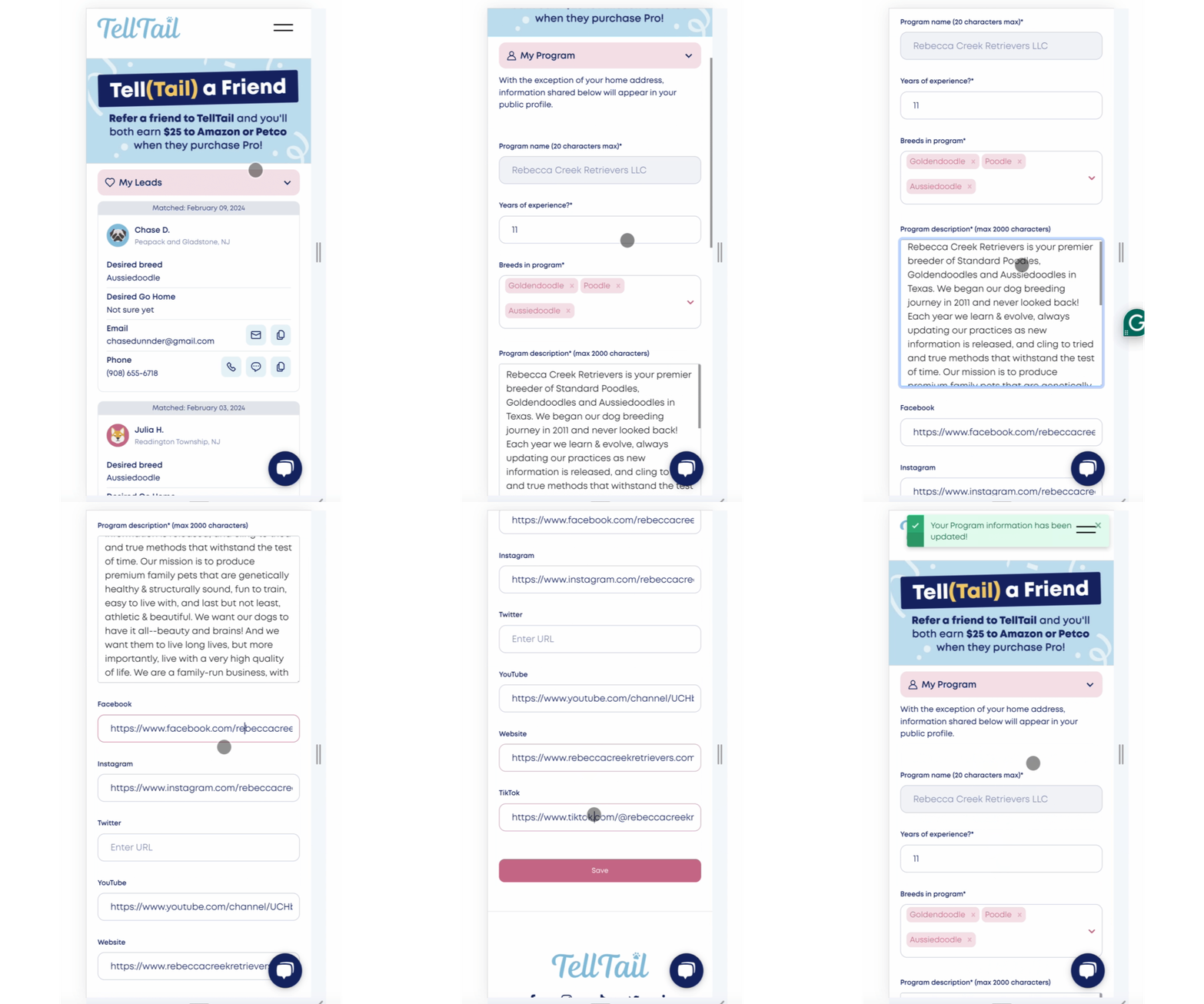
Edit Your Program Information
- Navigate to "My Program" from your navigation menu.
- The information in the "My Program" section is visible on your public profile. Be sure to share as much information in this section as you would like to provide potential buyers with a snapshot of your program.
Important Tip When Adding Links to Other Profiles:
- Be sure to include the full URL to each profile you wish to share.
- For example, your social media URLs should look like this:
- Facebook- https://www.facebook.com/rebeccacreekretrievers
- Instagram- https://www.instagram.com/rebeccacreekretrievers/
- YouTube- https://www.youtube.com/channel/UCHbzw6559wwW8-Y5TtSfVRQ
- Website- https://www.rebeccacreekretrievers.com/
- TikTok- https://www.tiktok.com/@rebeccacreekretrievers
- Using "handles" or any other text, other than the full URL as described above, will results in a link that will not direct users to your channels.
- For example, the following inputs for the channels mentioned above will not be functional links on your profile:
- Facebook- Rebecca Creek Retrievers (don't do this!)
- Instagram- @rebeccacreekretrievers (don't do this!)
- etc.